CodeEase is where the code work happens.

An expert Code Assistant, a Project Assistant with a full grasp of your project, a Master Card for every article, the building code in its original text, and each project kept with its documents and drawings.
blinkode.ca/codeease/OBCCodeEase
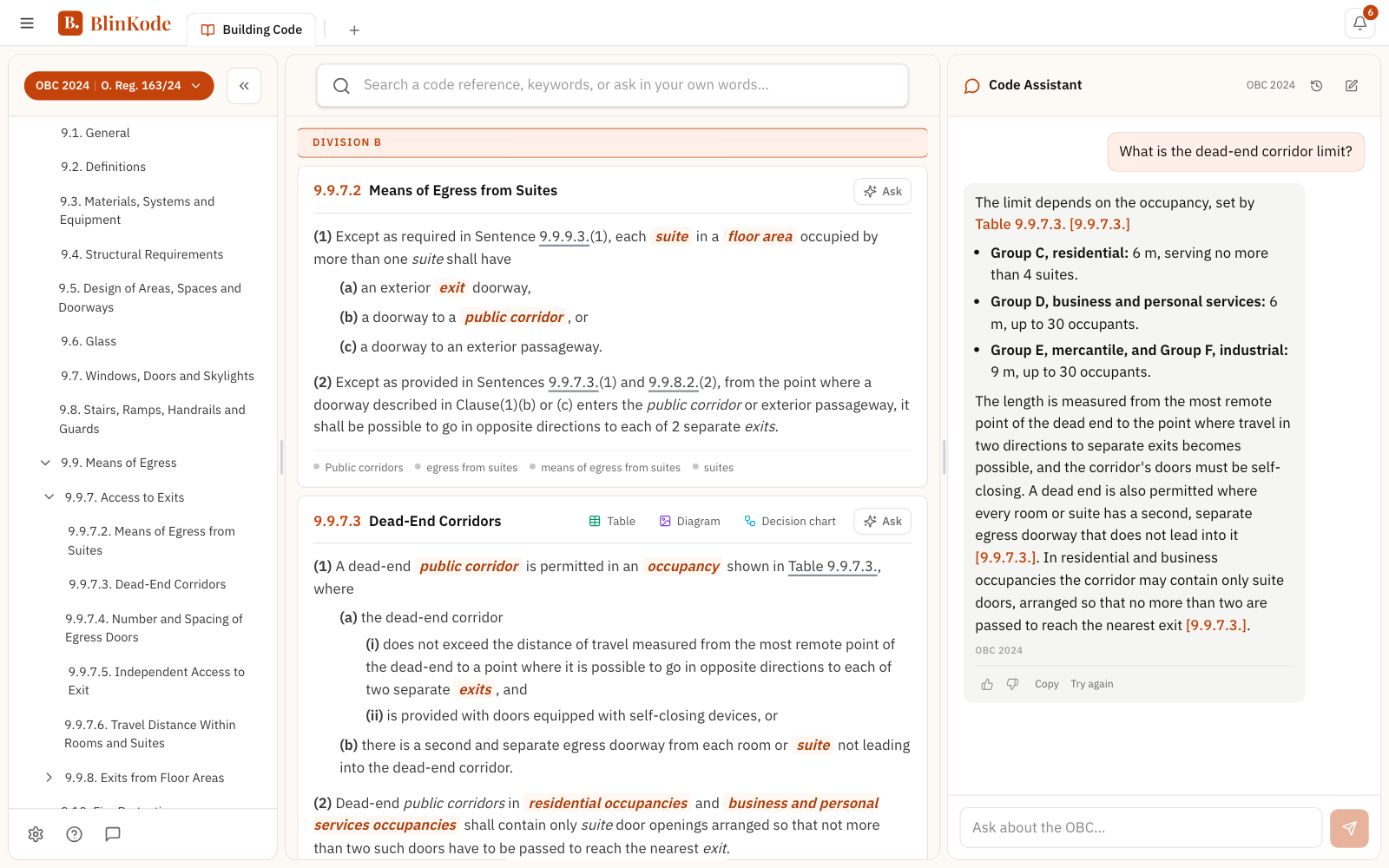
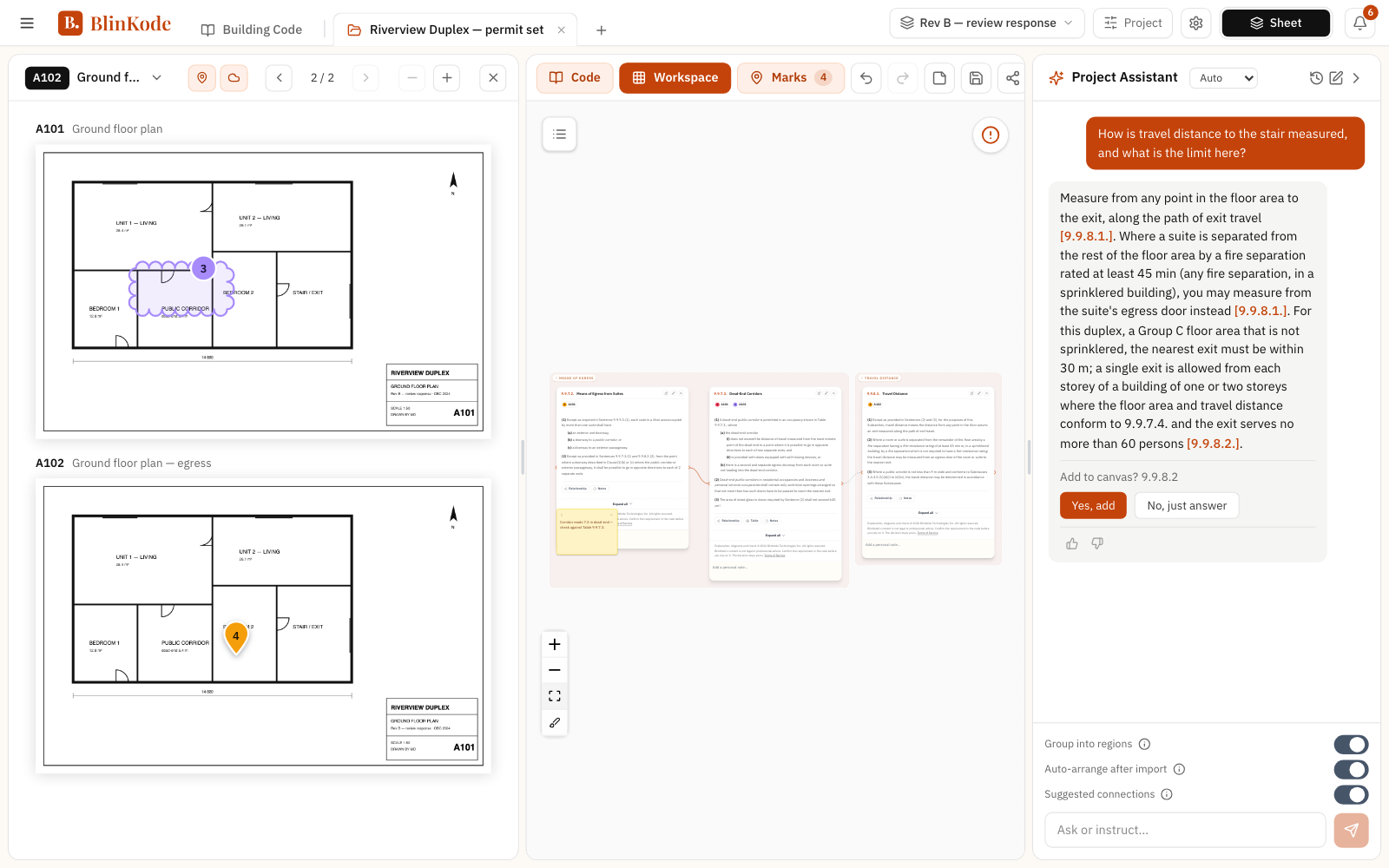
The CodeEase app: the code as a tree, the search bar, the articles in one scroll, and the Code Assistant answering with clause links.A CodeEase project: the drawings with their marks, the workspace of Master Cards, and the Project Assistant answering about the project.1
1The whole book, as a treeDivision → Part → Section → Article, scoped to the edition you pick. Change edition and navigation, search and cards all follow.
2One bar, three enginesExact code reference, keyword, or a question in your own words, resolved together into a single ranked list.
3Every clause, continuousThe full corpus in one scroll, with defined terms and symbols highlighted inline. Hover any term for its definition; open an article’s Master Card from its table, diagram or decision chart.
4The Code AssistantAsk in your own words. The answer comes straight from the code, with clickable clause links.
5The drawings, markedThe sheets of the issue in hand. Pin a point or cloud an area, then drag an article onto the mark to tie the clause.
6The WorkspaceThe project’s articles as Master Cards on one board, grouped into regions and connected by their cross-references.
7The Project AssistantAnswers Code questions about this project, and adds the articles to its board.
8Every issue, keptEach issue of the drawings keeps its own sheets and marks. Switch to an earlier one, or add the next.
One book, whole
OBC 2024, searchable and cited
Version-aware
navigation
24/7
Access anytime

Why CodeEase

Checking is part of the work

Even the most experienced people behind a building permit go back to the code on every project. What every check should bring back is the requirement, what it means for this building and its source.

Find the right article
One search bar across the whole code: exact code reference, keyword, or a question in your own words. Results rank the clause you meant, not just the words you typed.
Read it in plain language
A code-cited explanation sits beside the original text, never instead of it. Defined terms and symbols are highlighted inline, with the definition on hover.
See it as a diagram
Diagrams and animations translate spatial and system-level requirements into something you can check against a drawing.
Follow the conditions
A decision chart lays out the conditions, exceptions, and dependencies in order, so you can see which path your project actually falls under.
Move across references
An interactive relationship chart maps inbound and outbound references. Every box is clickable: the linked clause opens in place, no scrolling back through the book.
Keep the citation
Every card traces back to the code article it came from, in the edition you selected, so what you document is defensible.

Coverage

Select a building code

Choose the jurisdiction you want to explore. Each code is version-scoped. The edition you pick scopes the whole app: navigation, search, Master Cards, Code Assistant and Project Assistant.

Available now

Ontario Building Code

A distinct, standalone code specific to Ontario.

Code coverage

Covers all building types and construction requirements including fire safety, structural design, accessibility, plumbing, HVAC, and energy efficiency.

Browse OBC 2024
Coming soon

National Building Code

The federal “model” code that serves as the foundation for all other jurisdictions.

Code coverage

The baseline code covering construction standards across Canada, adopted by Saskatchewan, Manitoba, Atlantic provinces, and the Territories.

Coming soon

BC Building Code

A distinct, standalone code specific to British Columbia.

Code coverage

BC-specific requirements including seismic provisions, energy efficiency standards, and local climate considerations.

Coming soon

Alberta Building Code

A distinct, standalone code specific to Alberta.

Code coverage

Alberta-specific building standards addressing prairie climate, energy efficiency, and regional construction practices.

Coming soon

Quebec Construction Code

A distinct, standalone code specific to Quebec.

Code coverage

Quebec’s bilingual code system with province-specific requirements for all aspects of construction.

Coming soon

Vancouver Building Bylaw

A unique code specifically for the City of Vancouver, separate from the rest of BC.

Code coverage

City-specific regulations addressing Vancouver’s urban density, sustainability goals, and seismic requirements.

Every edition is addressed separately, so a card always says which book it came from. The Ontario Building Code 2024 is the edition live today.

The Master Card

One article, one card

CodeEase turns a code article into a structured Master Card, with the curated explanations and diagrams added as they are written. Everything on a card traces back to the article it came from.

What’s on a card
Original code text
Verbatim, with defined terms and symbols highlighted inline: hover for the definition or expansion
Explanation
Code-cited, and written to preserve the legal meaning rather than simplify it away
Diagrams & animations
A gallery with a main image and thumbnail strip, where a visual helps
Decision chart
The article’s conditions, exceptions and outcomes, branch by branch
Tables
Where present in the source article or explicitly referenced by it
Relationship chart
Inbound and outbound references as a clickable map: every box opens that clause in place
Referenced documents
External standards the article cites: title, issuing agency, document number
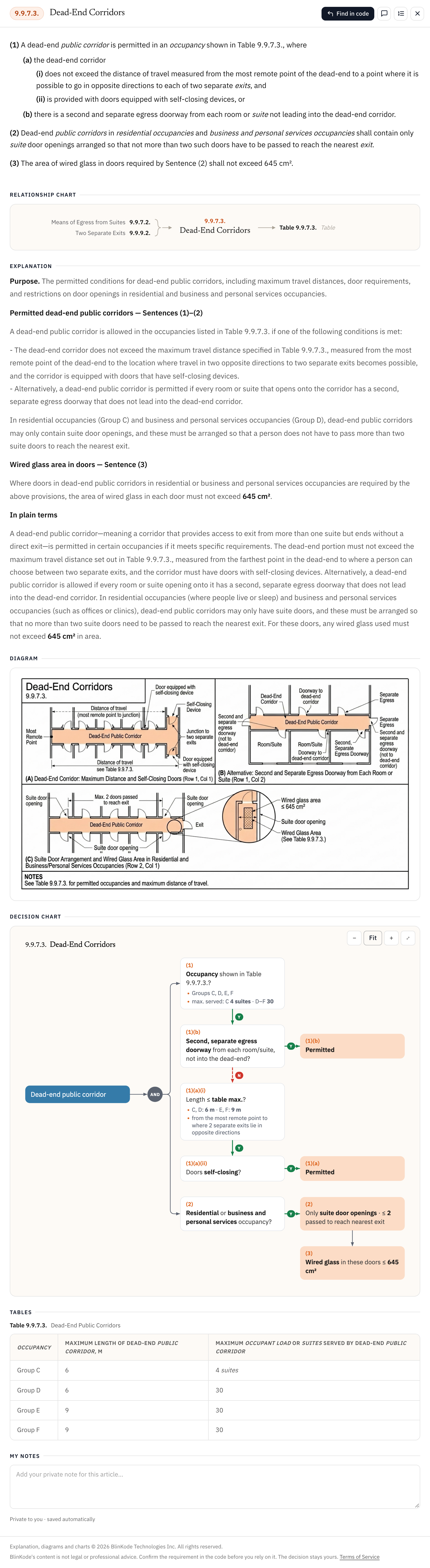
A full CodeEase Master Card, Dead-End Corridors, OBC Div. B Article 9.9.7.3, showing the original code text, relationship chart, explanation, diagram, decision chart and table.hover to pause

A real Master Card: Dead-End Corridors, OBC Div. B, Article 9.9.7.3.

The Workspace

Somewhere to put the code you’re actually working with

Beyond reading, CodeEase gives you a canvas-style workspace: organize the articles that matter to a project, mark them up, and connect them to the drawing.

Cards on a board
Drag any Master Card out of the code onto the canvas and group them by topic, one board per project.
Wired to each other
Connect cards by hand, or let the relationship chart wire in a referenced clause already attached on the correct side.
Pinned to the drawing
Upload a sheet and pin a card or a note to the exact spot it governs. Highlights and notes stay attached to the code.
Project Assistant
A skilled Project Assistant with a full grasp of your project works inside it: it brings the right articles onto the board, answers from them, and asks before it assumes.

Free tools

Code Matrix and DocHub

Two tools beside CodeEase, both free. Three Code Matrix lines open with no account, the rest with a free account; reading DocHub is free, and an account keeps a shelf and your notes.

Code Matrix
The requirements that follow from a building’s facts, its occupancy, storeys, area and use, worked out from what you enter once, each with its source. Every result is a derivation, not a number: each step with its arithmetic and its article, and the article opens on its Master Card.

Use Code Matrix

DocHub
Municipal permit documents, organised and searchable. The forms, checklists, fee schedules, by-laws and bulletins a municipality publishes for a permit, kept as the originals and read in place, by municipality and by kind of document, with one search across them.

Use DocHub

Built on trust

Guidance you can stand behind

Every requirement comes with its source, so it can be verified in the code itself.

Every requirement with its source
Every Master Card links back to the article it came from, in the edition you selected.
The decision stays yours
BlinKode does not decide. The people who do this work do.
Approval stays with the building official
BlinKode does not approve anything. That stays with the building official. BlinKode is not legal advice.
The original text is there
The explanation sits beside the code text, never instead of it, so you can check it against the article.

BlinKode does not guarantee compliance or a permit. BlinKode does not run on its own. What it brings is read by a professional before anything is drawn, submitted or approved.

Ready to explore the code?

Start with the Ontario Building Code 2024: the whole book, with Master Cards, Code Assistant, Project Assistant and the workspace.

Free for 30 days, no card. We email you when it is ready.